
Understanding the Laptop Market
Buying a Laptop Has Never Been More Complicated
Buying a laptop used to be relatively simple. You chose a screen size, compared a few processors, and picked the model that fit your budget.
Today, the decision is far more complicated.
Modern buyers are confronted with dozens of processor families, multiple operating systems, AI-powered features, OLED displays, refresh rates, memory configurations, storage options, battery claims, and countless model variations. Even laptops with similar specifications can deliver very different real-world experiences.
As a result, many people spend more than they need—or buy a machine that doesn’t actually fit the way they work.
The problem isn’t a lack of choices.
The problem is understanding which choices actually matter.
Why Choosing a Laptop Is So Confusing
Most manufacturers advertise technical specifications.
Consumers, however, are trying to solve everyday problems.
They aren’t asking:
- Which processor has the highest benchmark?
- Which GPU has the most cores?
They’re asking questions like:
- Will this laptop last through four years of college?
- Can it edit 4K videos smoothly?
- Is it powerful enough for programming?
- Do I really need a dedicated graphics card?
- Is an AI PC worth paying extra for?
- Should I buy a MacBook or a Windows laptop?
Those are buying decisions—not specification comparisons.
Unfortunately, many review websites assume readers already understand technical terms. That often leads people to focus on impressive numbers instead of the features that genuinely improve daily use.
The Ranking Standard Philosophy
Most laptop buying guides begin by ranking brands or recommending “the best laptop.”
We don’t.
At Ranking Standard, we believe there is no universally perfect laptop.
A university student has completely different priorities from a professional video editor.
A frequent traveler values battery life and portability more than maximum performance.
A software developer may prioritize memory and keyboard quality, while a gamer cares about graphics performance and cooling.
The right laptop depends on who you are, how you work, and what you expect from your computer.
That’s why we begin with your needs—not with a brand.
Before comparing Apple, Dell, Lenovo, HP, ASUS, Acer, Samsung, Microsoft, MSI, or Razer, we’ll help you understand which type of laptop actually fits your lifestyle.
Why This Matters More Than Ever
Artificial intelligence is rapidly changing the laptop market.
Manufacturers now promote AI PCs, dedicated neural processing units (NPUs), on-device AI features, and new processor architectures alongside traditional CPU and GPU performance.
At the same time, battery efficiency, display quality, repairability, and long-term software support have become just as important as raw speed.
A laptop is no longer just a computer.
For many people, it’s their office, classroom, creative studio, entertainment center, and communication hub—all in one device.
Choosing wisely can improve productivity for years.
Choosing poorly can become an expensive mistake.
What You’ll Learn
By the end of this guide, you’ll understand:
- The major categories of laptops and who they’re designed for
- Which specifications actually matter in everyday use
- When premium models are worth the extra cost
- How to balance performance, portability, battery life, and price
- The biggest mistakes laptop buyers make
- The evaluation framework Ranking Standard uses to compare laptops fairly
In Part 2, we’ll break down the laptop market by category, operating system, performance level, and use case, helping you identify the right type of laptop before comparing individual brands or models.
Understanding Laptop Categories Before Choosing a Brand
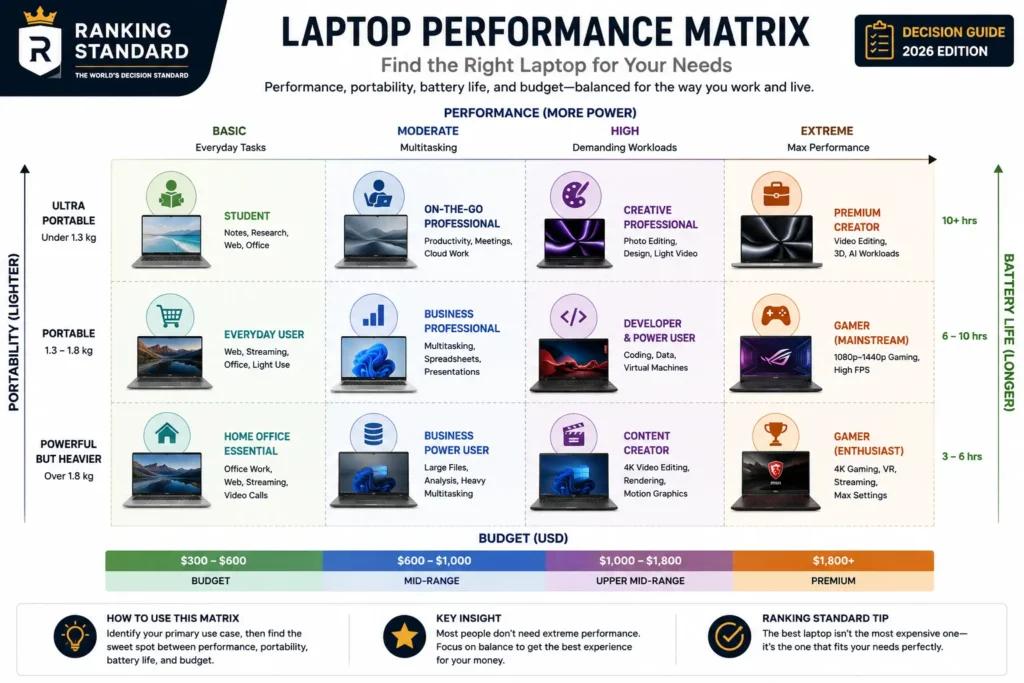
Step 1: Start With How You’ll Use Your Laptop
The biggest mistake buyers make is choosing a laptop based on specifications instead of how they’ll actually use it.
Before comparing brands, decide what role your laptop will play in your daily life.
Everyday Laptops
These laptops are designed for web browsing, email, video streaming, online shopping, Microsoft Office, and light multitasking.
For most people, this category offers the best balance between price and performance.
Best for:
- Families
- Casual users
- Home offices
- General productivity
Student Laptops
Students need portability, long battery life, reliable performance, and durability.
A lightweight laptop that lasts all day is often a better investment than one with the fastest processor.
Priorities:
- Lightweight design
- Excellent battery life
- Comfortable keyboard
- Reliable webcam
- Affordable price
Business Laptops
Business laptops prioritize reliability, security, and productivity rather than flashy specifications.
Many include enterprise-grade security, stronger build quality, better keyboards, and longer software support.
Best for:
- Professionals
- Remote workers
- Frequent travelers
- Corporate environments
Creative Laptops
Creative professionals require higher performance for demanding applications.
These workloads often benefit from:
- Powerful multi-core processors
- Dedicated graphics
- Color-accurate displays
- Large memory capacity
- Fast SSD storage
Best for:
- Video editing
- Graphic design
- Photography
- 3D modeling
- Music production
Gaming Laptops
Gaming laptops focus on graphics performance and cooling.
Unlike many other categories, the graphics processor often matters more than the CPU.
Expect:
- Dedicated GPUs
- High-refresh-rate displays
- Advanced cooling systems
- Larger power adapters
- Higher overall weight
Step 2: Choose the Right Operating System
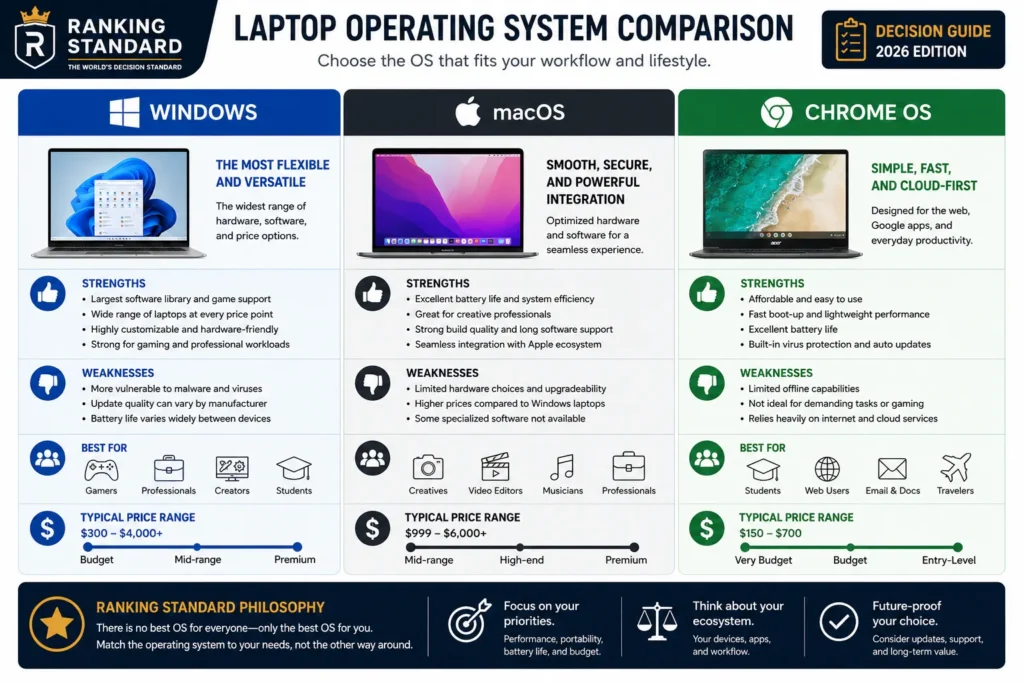
The operating system shapes your daily experience just as much as the hardware.
Windows
Windows offers the widest hardware selection across every price range.
Advantages include:
- Largest software library
- Excellent gaming support
- Broad hardware compatibility
- Wide variety of manufacturers
Ideal for most users.
macOS
Apple’s macOS emphasizes efficiency, simplicity, and ecosystem integration.
It is especially popular among creative professionals and users already invested in Apple devices.
Strengths include:
- Outstanding battery life
- Excellent build quality
- Long software support
- Strong performance per watt
ChromeOS
Chromebooks are designed primarily for cloud-based computing.
They’re simple, affordable, secure, and often provide exceptional battery life.
Best suited for:
- Students
- Web browsing
- Online learning
- Basic office work
Step 3: Understand What Actually Matters
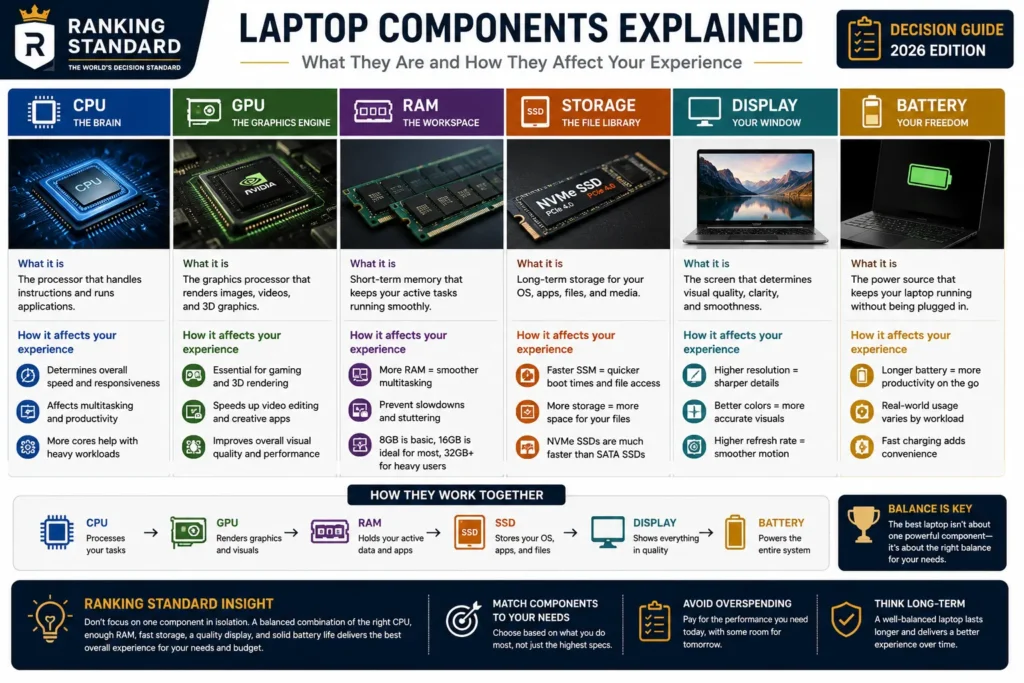
Many buyers pay attention to the wrong specifications.
Here’s what deserves your attention.
Processor
The processor determines overall responsiveness and multitasking capability.
Instead of chasing the newest model number, choose a processor that matches your workload.
Memory (RAM)
More memory allows smoother multitasking.
General guideline:
- 8GB – Basic users
- 16GB – Most buyers
- 32GB+ – Professional workloads
Storage
Fast SSD storage is now essential.
Capacity matters less than speed for most users, but creators and gamers often benefit from larger drives.
Display
A display affects your experience every time you use the laptop.
Consider:
- Resolution
- Brightness
- Color accuracy
- Refresh rate
- Screen size
- Panel technology
A high-quality display often improves everyday satisfaction more than a slightly faster processor.
Battery Life
Manufacturer claims are usually measured under ideal conditions.
Real-world battery life depends on:
- Screen brightness
- Workload
- Processor efficiency
- Background applications
Look for independent testing rather than marketing numbers.
Step 4: Match Your Budget
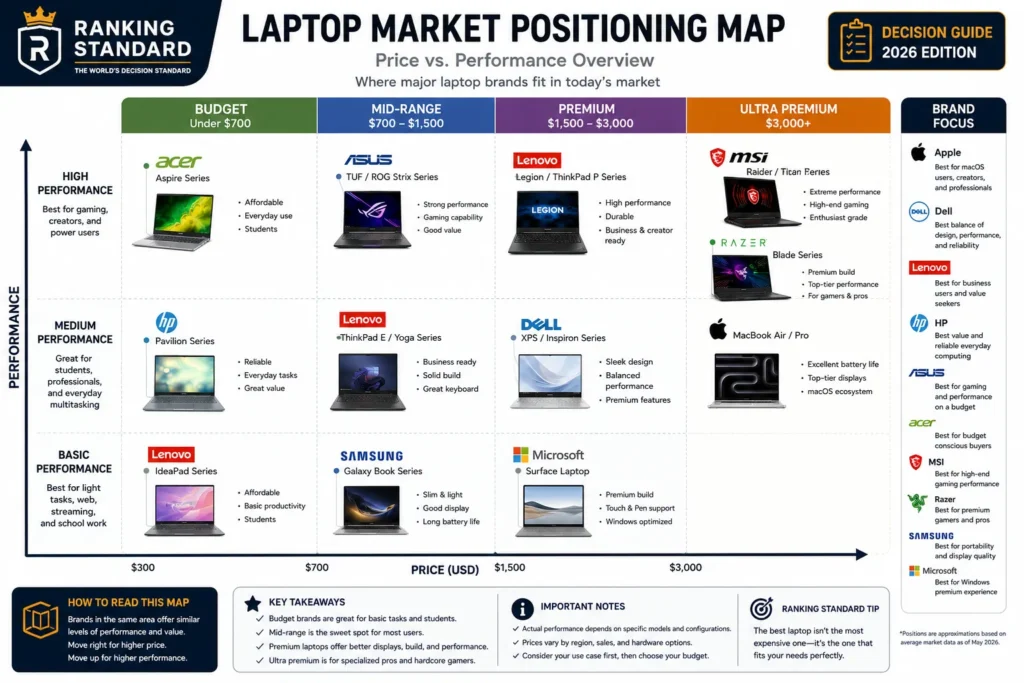
Budget ($400–700)
Suitable for:
- Students
- Web browsing
- Office work
- Everyday computing
Expect fewer premium materials and less powerful processors.
Mid-Range ($700–1,300)
This is where most buyers find the best value.
Typical features include:
- Fast processors
- 16GB RAM
- High-quality displays
- Excellent battery life
- Premium build quality
Premium ($1,300+)
Premium laptops focus on delivering the best overall experience rather than simply increasing performance.
Benefits often include:
- Superior displays
- Premium materials
- Longer battery life
- Better speakers
- Faster processors
- Advanced AI features
Step 5: Think About the Next Five Years
A laptop is typically kept for four to six years.
Don’t buy only for today’s needs.
Consider how your work, studies, or hobbies may change over time.
Buying slightly more memory or storage today can extend the useful life of your laptop and delay the need for an expensive replacement.
Ranking Standard’s Key Takeaway
Don’t choose your laptop by asking,
“Which brand is best?”
Instead, ask:
- What will I use it for?
- Which operating system fits my workflow?
- How important are portability and battery life?
- What specifications do I actually need?
- What’s my realistic budget?
- How long do I expect to keep this laptop?
Once you’ve answered those questions, comparing brands like Apple, Dell, Lenovo, HP, ASUS, Acer, Samsung, Microsoft, MSI, and Razer becomes much simpler—and far more meaningful.
In Part 3, we’ll introduce the Ranking Standard Laptop Evaluation Framework, explaining exactly how we evaluate laptops across performance, portability, display quality, battery life, value, and long-term ownership.
The Ranking Standard Laptop Evaluation Framework
How Ranking Standard Evaluates Laptops
Many laptop reviews focus almost entirely on benchmark scores.
While performance is important, benchmarks alone don’t tell you whether a laptop is enjoyable to use every day.
At Ranking Standard, we believe a great laptop is the one that delivers the right balance of performance, portability, reliability, battery life, display quality, and long-term value for its intended user.
Instead of asking,
“Which laptop is the fastest?”
we ask,
“Which laptop is the right choice for this type of buyer?”
That’s the philosophy behind every recommendation we make.
Our Evaluation Criteria
Performance (30%)
Performance should always match the intended workload.
We evaluate:
- CPU performance
- GPU performance
- Multitasking capability
- Thermal management
- Sustained performance under load
- AI processing capabilities where applicable
A laptop that maintains consistent performance is often more valuable than one with higher peak benchmark scores.
Display & User Experience (20%)
The display is the part of the laptop you interact with every day.
We assess:
- Brightness
- Color accuracy
- Contrast
- Resolution
- Refresh rate
- Outdoor visibility
- Keyboard quality
- Trackpad performance
- Speaker quality
A premium display and comfortable keyboard can significantly improve productivity and overall satisfaction.
Portability & Battery Life (20%)
Power is only useful if you can take it where you need it.
We consider:
- Weight
- Thickness
- Charger size
- Real-world battery life
- Charging speed
- Travel convenience
For many users, lasting through a full workday is more valuable than having the fastest processor.
Build Quality & Reliability (15%)
A laptop is a long-term investment.
We evaluate:
- Chassis durability
- Hinge quality
- Cooling design
- Repairability
- Software stability
- Long-term reliability
Well-built laptops often remain enjoyable to use long after newer models are released.
Value for Money (10%)
Higher prices should provide meaningful improvements—not just premium branding.
Our value assessment includes:
- Features relative to price
- Performance per dollar
- Upgrade potential
- Expected lifespan
- Included accessories
The most expensive laptop is not always the smartest purchase.
Ownership Experience (5%)
Small details shape the ownership experience over time.
We examine:
- Software updates
- Customer support
- Warranty options
- Ecosystem integration
- Ease of maintenance
These factors become increasingly important over several years of ownership.
The Biggest Mistakes Laptop Buyers Make
Many people spend hundreds of dollars on features they’ll never use.
The most common mistakes include:
- Buying far more performance than needed.
- Choosing a gaming laptop for office work.
- Prioritizing processor names over real-world experience.
- Ignoring display quality.
- Buying the cheapest model without considering longevity.
- Overlooking battery life and portability.
- Focusing on specifications instead of daily workflow.
The best laptop is rarely the one with the longest specification sheet.
It’s the one that fits your lifestyle.
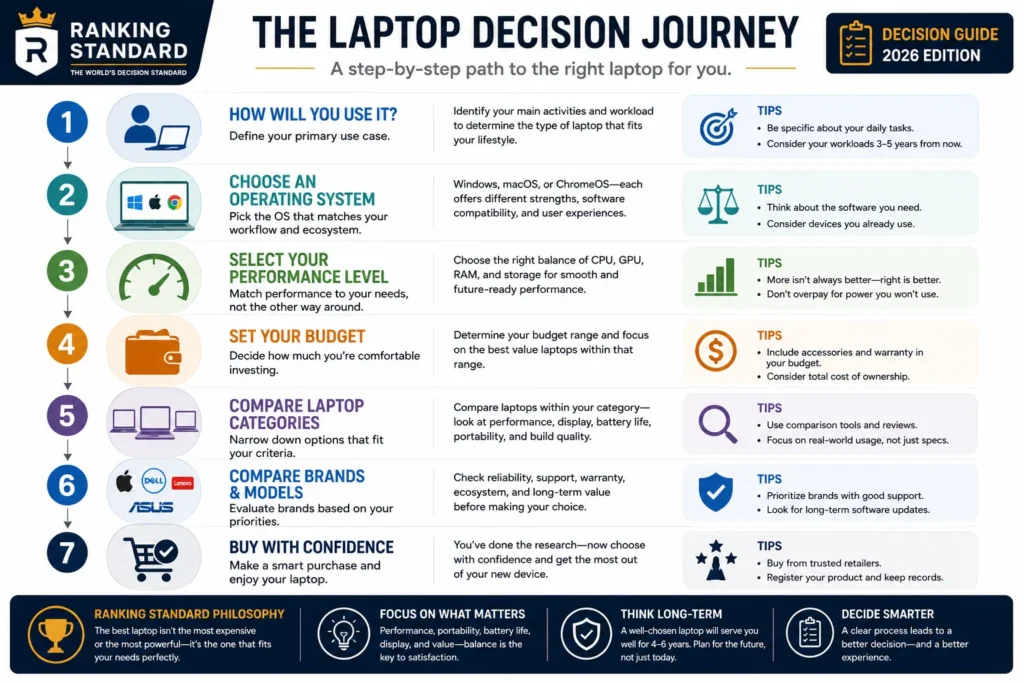
Final Thoughts
The laptop market has never offered more choice—or created more confusion.
With AI PCs, new processor architectures, OLED displays, dedicated graphics, and dozens of competing models, it’s easy to believe that newer always means better.
In reality, the best laptop is the one that matches your work, your budget, and your expectations.
That’s why Ranking Standard begins with understanding the buyer before comparing the product.
Once you know what kind of laptop you actually need, every buying decision becomes clearer.
Special Note
Laptops are among the most misunderstood purchases in consumer technology.
Marketing encourages shoppers to chase bigger numbers, faster processors, and the latest buzzwords.
Real life doesn’t work that way.
A student, a business traveler, a software developer, a photographer, and a gamer may all buy laptops in the same price range, yet each should choose a completely different machine.
That’s why Ranking Standard doesn’t start with brands.
We start with people.
When you understand your own needs first, the right laptop usually becomes obvious—and that’s the difference between buying a laptop you’ll replace in two years and one you’ll enjoy using for five or more.